Basics linux command
#Day2 #DevOps #90daysofDevops #trainwithshubham #AWS #linux
👋 Hello, and welcome to my DevOps journey! 🚀 I am Priyanka Varshney,🛠️ As an aspiring DevOps engineer, I'm all about bridging the gap between development and operations, making software delivery seamless and efficient. 💻🔧 On this Hashnode blog, I'll be sharing my learnings, experiences and adventures as I dive deep into the world of continuous integration, automation, and cloud technologies. ☁️⚙️ Let's connect, learn, and grow as a vibrant DevOps community. Follow my Hashnode blog, and let's embrace the DevOps adventure together! 🤝🔗
Introduction:
Linux is a free and open-source computer operating system that allows users to run programs and manage their computer's hardware and software. It's like the brain of your computer, helping it perform tasks and allowing you to interact with it using a graphical interface or text commands. Linux is known for its stability, security, and flexibility.
Task 1:Check your present working directory.

The 'pwd' command is used to check the current working directory path, starting from the root(/).
Task 2:List all the files or directories including hidden files.

The 'ls' command is used to list the files and directories and the 'ls-a' command is used to list all the files or directories including hidden files. It will show the list in a long list format.
Task 3:Create a nested directory A/B/C/D/E.
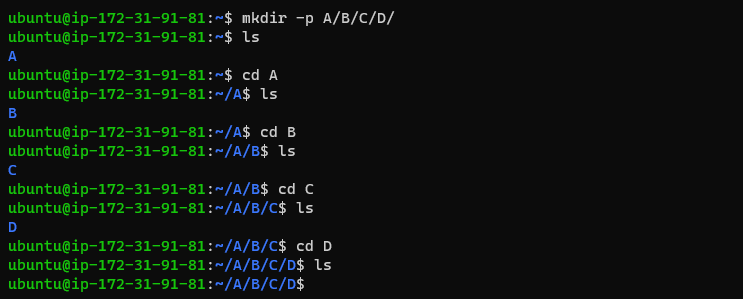
The '-p' flag is used with the mkdir command to create a directory inside another directory. Using the -p flag will let mkdir know that it is okay to make a parent directory if it does not exist yet, and then create a nested child directory.
Thank you for reading :)
Priyanka varshney